Setup
Register your form
To make possible to accept submissions for a form, you need to register the form using the dashboard and then set the form action attribute to the generated submit URL.
You can use the same registered form for several forms of your site but it will make harder to understand what form is submitted.
Form registering example:
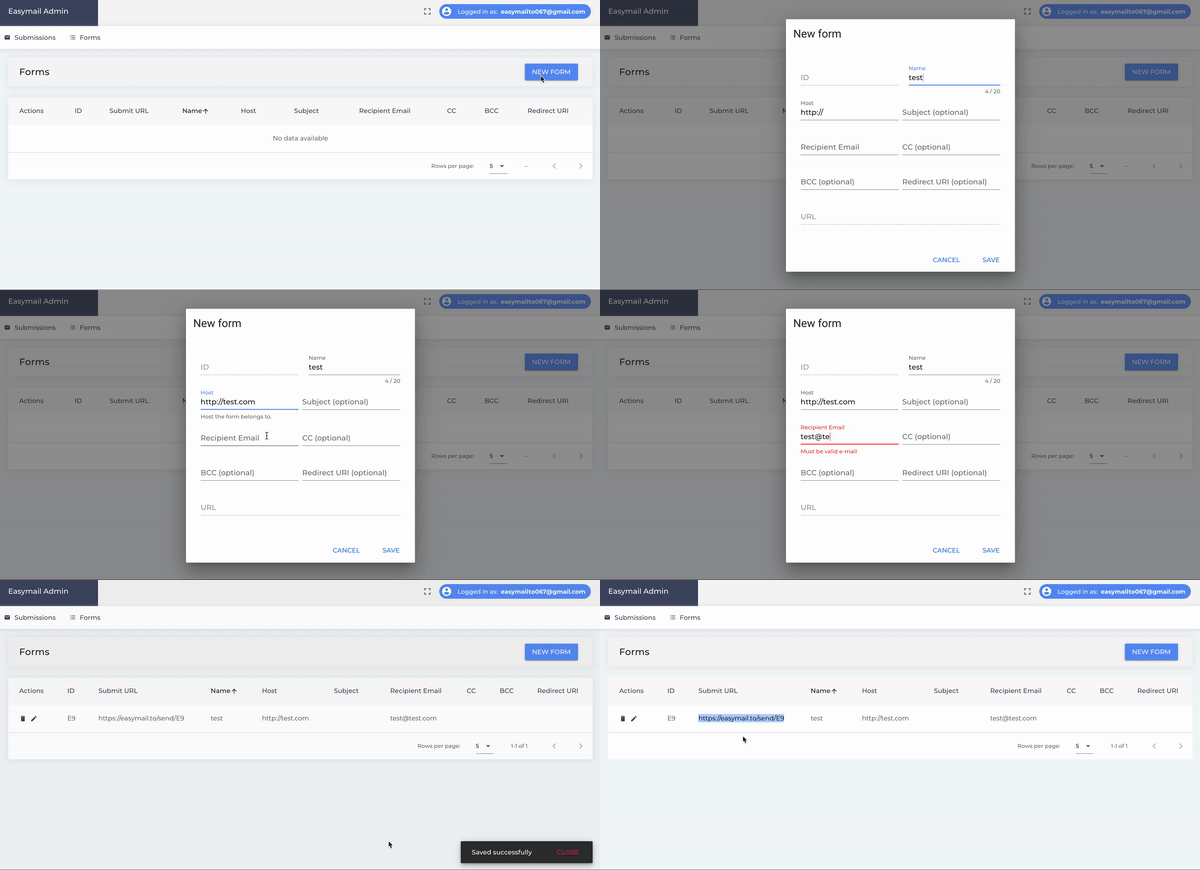
Set the form action
Specify the generated form submit URL to be the form's action and you are ready to get submissions.
<form action="https://api.easyform.sh/send/lY7Wg7v2" method="post">
    <input type="text" name="message">
    <input type="submit" value="send">
</form>
Predefined form attribute
There are a set of predefined attributes at your disposal. You have two ways to specify the attributes: using the dashboard or just specifying them right in the form code.
If your set values for the predefined attributes in the dashboard then they are injected when the form is submitted. It is still possible to overwrite those values by specifying the attributes in the form html code.
Available predefined attributes
| # | Name | Description |
|---|---|---|
| 1 | _to | Specify here the main recipient who gets the submission notification by email. |
| 2 | _cc | Specify here the recipients who get the copy of the notification (separate several emails with comma). |
| 3 | _bcc | Specify here the recipient who gets the notification but is hidden from other recipients. |
| 4 | _replyTo | Specify here the addressee who is supposed to be replied to. |
| 5 | _subject | The subject of the submission. |
| 6 | _redirect | URI to redirect to after the submission is done. |
| 7 | _bot | Ddd this field to your form if you want to defend bots. The form is not submitted if this field is filled. |
Sample form with the predefined attributes:
<form action="https://api.easyform.sh/send/lY7Wg7v2" method="post">
    <input type="hidden" name="_to" value="to@easyform.sh">
    <input type="hidden" name="_cc" value="cc@easyform.sh">
    <input type="hidden" name="_subject" value="contact submission">
    <input type="text" name="message">
    <input type="submit" value="send">
</form>